727-201-9283
4615 Gulf Blvd #119 St. Pete Beach Fl.33706


How to Book
Choose Your Class
Select the type of class you’d like to book and click the Book button.

Select Date

Select Time then click NEXT
make sure the time you choose is on black.

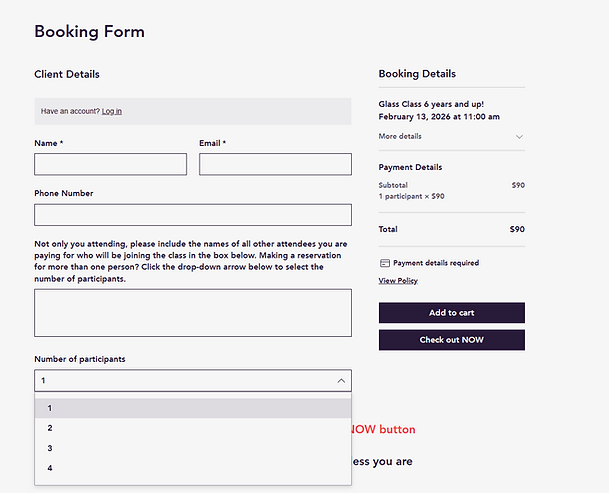
Enter Your Details
Fill in your first name and last name, and provide a valid email address so you can receive your booking confirmation and payment receipt.
-
If you’re booking for others, enter the names of any additional paid participants.
-
Choose the number of paid participants using the drop-down menu (up to 6 people per booking).
Review and Confirm
Click CHECK OUT NOW. Review your customer details to make sure everything is correct, then click Continue.

Payment
Enter your payment information, scroll down to check the “I agree to the Terms and Conditions” box, and then click Place Order and Pay.
Have a promo code? Click “Promo Code.”
Have a gift card? Click “Gift Card” and enter the code.
To receive the discount,(PROMO CODE)
each participant must be booked separately—one booking per transaction.
Confirmation
Within 4–5 minutes, check your email ( and spam) for a confirmation message confirming your booking and payment.